
How Booked55 helps sales managers manage their team
A sales manager has one job: find the blockers. The rep who books meetings and never closes. The one who added nobody new for three weeks. A spreadsheet cannot show you either, because all it holds is what someone typed. Booked55 holds what people did, and shows you without asking anyone.
Here is what a day looks like when you manage a team on it.
Monday, 7 am: the email
Every Monday morning you get one email with the team's last week. Each rep scored out of ten, the way the Scoreboard scores them. Who was busiest. Who was quietest. The one move to make next. You read it with your coffee and you already know how the week went before anyone tells you.
Each rep gets their own version: their six numbers and one or two things to do more of. So by the time you talk to them, they have seen what you have seen.
9 am: the Scoreboard
Open any rep's Scoreboard and you see their whole year, one dot per working day, darker when more got done. Under the overview, the six things that drive sales each get their own heat map: events attended, contacts earned, calls, meetings and the rest, with a total, a daily average and a rating. Pick a month and you see exactly what they did in it.
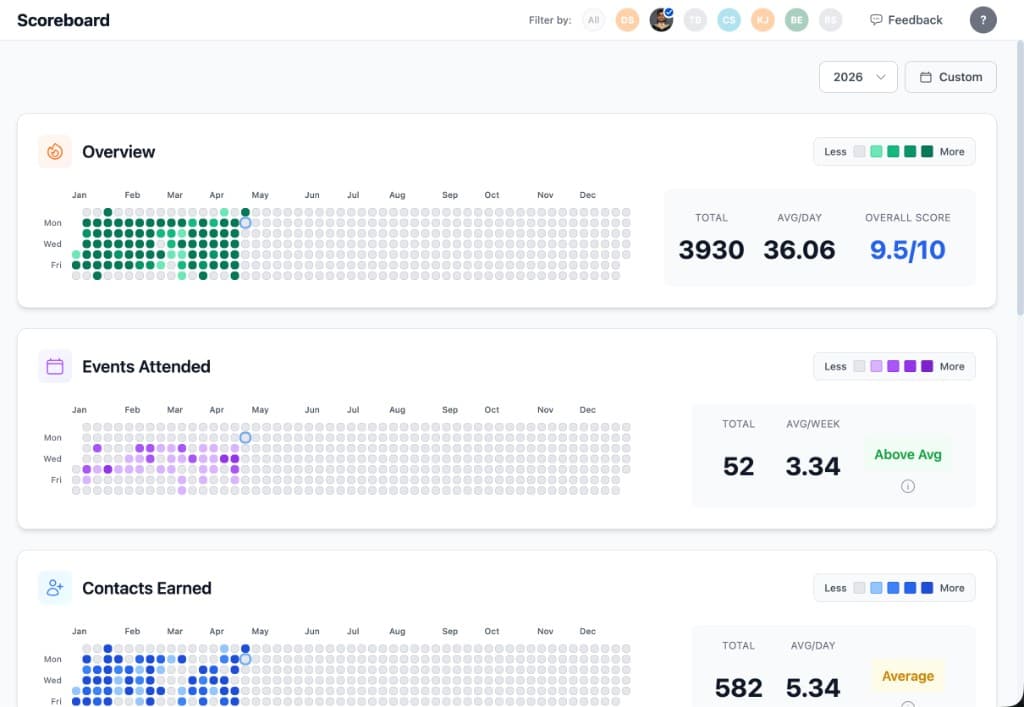
The Team Scoreboard puts everyone side by side for the same period, so a slow week stands out next to the others. A rep who is doing more, and more consistently, shows it. A rep who is slipping shows it too, three weeks before it shows up in revenue.
Monday: a meeting about blockers
You have sat through the version of this meeting where the first twenty minutes are spent collecting numbers. Everyone has. Last week is the view that matters, because every Monday you sit down with the team, and on Booked55 the numbers are already on the screen: the events each person went to, the contacts they added, the calls they made, the meetings they held. So the meeting is about the one thing you are there for. Why did those meetings not turn into next steps? Why did those calls not turn into meetings? Where is the blocker, and what do we change?
If you want it written for you, the weekly coaching report reads each pipeline and tells you, per rep, what to push on.
The rest of the week: the playbook lives on the pipeline
Your job is also to build the system: the script, the playbook, how often each kind of person hears from us. In Booked55 you design the pipelines, and every stage gets a cadence, a rule like "new task every 2 to 3 days" or "every 28 to 34 days". While a person sits in that stage, Booked55 makes the next task for their rep on that schedule, and it lands on the rep's daily list. Nobody gets forgotten, and nobody has to be organized for that to be true.
Stage automations do the rest: a person who has sat in a stage too long moves on their own, a card changes colour when it goes quiet, a deal is written when someone enters the client stage. The playbook runs the same way for every rep, including the one you hired last week.
Three pipelines come with every account: Now Opportunity for people who need you now, Future Opportunity for people who might one day, and a referral pipeline for people who send you people. Change the names, the stages and the days to match how your team sells.
Who sees what
You and the owner see everything: every rep's contacts, boards, tasks and Scoreboard. A rep sees their own. If you run more than one team, each team is its own workspace under one account, and the account owner sees across all of them.
What your reps get
The reason the numbers above are real is that the reps actually use it, and they use it because it gives them their day. The phone app scans a business card at an event and the lead is in the CRM before they are back at the office. They call from the app, the call is recorded and written up on the contact. They text from the app. They send bulk email, build templates, and design their own sequences and outreach steps however they like to work. Every one of those actions lands on the Scoreboard without anyone logging it.
There is a lot more, and it is all on the features page.
Common questions
Do I need to be the owner to see the team?
No. Owners and managers both see every rep's contacts, boards, Scoreboard and tasks. A rep sees their own. There is no permission matrix to set up.
Can I run more than one team?
Yes. Each team is its own workspace under one account, with its own pipelines and its own Team Scoreboard, and the account owner sees all of them.
What if a rep leaves?
Their contacts, tasks and history stay in the workspace. Reassign the contacts to someone else and the cadences carry on under the new name.
Does the Monday email need setting up?
No. Every owner and manager gets it at 7 every Monday morning, with the team's last week. Turn it off under your notification settings if you would rather open the Scoreboard yourself.
See your team's week on one screen
Fourteen days free. Add your reps, build the pipelines, and read Monday's email before Monday's meeting.
Start Free Trial