What are the best HubSpot alternatives for a 25-person company that has outgrown the free plan?
HubSpot is good software. The free plan is generous, which is why you are on it. The trouble starts the day you outgrow it, because the next step up is several prices at once: a hub, a tier, a seat count, a contacts tier and an onboarding fee. The usual alternatives are Pipedrive, Close, Zoho CRM, Copper and Booked55. Before you compare them, write down what a 25-person company actually needs. Then the choice gets short.
Audio is played by ElevenLabs, which loads only when you press the button. Privacy Policy
Why the free plan stops being free
The free CRM is one product. Paid HubSpot is several, sold as hubs, each with Starter, Professional and Enterprise tiers. Sales seats are priced per person. Marketing is priced by how many contacts you keep. The Professional tiers come with a required onboarding fee that has run from $1,500 to $3,000 depending on the hub. And the thing everyone likes about HubSpot, that it can be customized to fit how you sell, costs either a consultant or someone on staff who already knows how.
None of that is a scandal. It is how a platform for companies of every size has to be priced. But for a 25-person company it means the bill is hard to predict and the setup is somebody's second job. That is usually why people search for alternatives.
What a 25-person company needs
Say twenty-five people, of whom eight to twelve sell and one or two manage them. The list is:
- A price you can say out loud: per seat, one plan, no add-on catalog.
- Pipelines that fit how you sell, without a consultant to set them up.
- A manager's view of the week. Who did what, who is slipping, before Monday's meeting.
- A phone app the reps will use, because the reps are at events and in cars rather than at desks.
- Email outreach built in: templates, sequences, bulk sends, without a separate marketing hub.
- Calls and texts in the same place as the contact, so the record is complete without anyone typing.
The alternatives, by what they are good at
Each of these is a real option for a company your size. Pick by what you need from the list above.
- Pipedrive. Pipeline first, priced per seat, easy to set up. Good if your sales are deal-driven and you mostly want a clean board and activity reminders. Marketing and calling are extras.
- Close. Built for inside sales teams that live on the phone. Calling, texting and email sequences are the core. Less suited to teams whose selling happens at events and over coffee.
- Zoho CRM. Wide and inexpensive, with a lot of modules. Takes real setup time, and the admin work tends to land on one person.
- Copper. Lives inside Google Workspace. Good if everything you do is in Gmail and Calendar and you want the CRM to follow that.
- Booked55. Built for teams whose sales are relationships: the rep meets people, follows up on a rhythm, and the manager needs to see the week. One plan, a phone app that does the capture, calls and texts on the contact, and a Scoreboard for the manager. The rest of this post is about that one, because it is ours.
One more honest option: stay. If your marketing team lives in HubSpot and only three people sell, two Sales Hub Starter seats cost less than any migration, and you can stop reading here. If your sales are deal-driven and you just want a board, pick Pipedrive. If your reps are on the phone all day, look at Close. If your reps are out meeting people and your manager wants to know what happened last week without asking, read on.
What a sales manager gets from Booked55
The Scoreboard. It shows the whole year, every day, as a heat map: one dot per working day, darker when more got done. Under it, the six things that drive sales, each with its own map: events attended, contacts earned, calls, meetings, and so on, with a total, a daily average and an overall score out of ten.
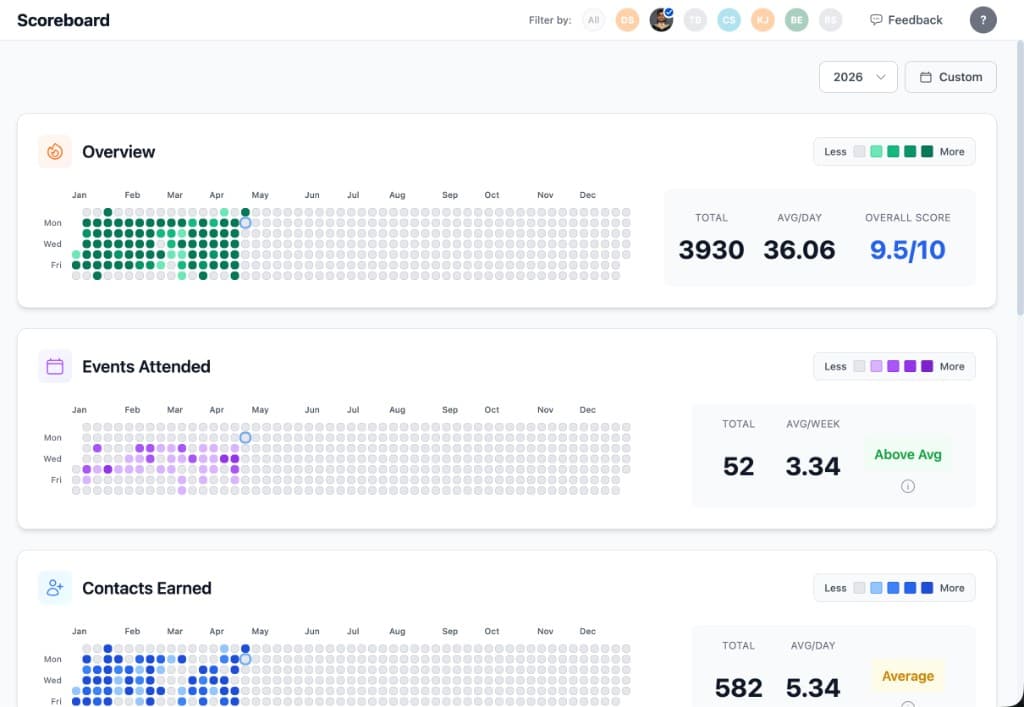
The manager opens any rep's Scoreboard and sees their whole month at a glance. The Team Scoreboard puts everyone side by side. Last week is the view that matters, because every Monday you sit down with the team and you can see exactly what each person did: the events they went to, the contacts they added, the calls they made. The meeting is about blockers instead of collecting numbers.
You do not even have to open it. Every Monday morning the owner and the managers get an email with the team's last week, who was busiest, who was quietest, and the one move to make next.
To make the week easier to run, you design the pipelines and put a cadence on every stage. A cadence means the system creates the next task for the rep on a schedule, so nobody in the pipeline gets forgotten and the playbook runs itself. More on all of that on the sales managers page.
What a rep gets
The phone app. A rep at an event scans a business card and the lead is in the CRM before they are back at the office. They call from the app and the call is recorded and written up on the contact. They text from the app. They send bulk email and build templates for the basic marketing a rep needs. Each rep designs their own sequences and outreach steps, however they like to work. There is a lot more, and we would rather not write the whole speech here. If you want to see what a salesperson gets, see the features page.
The price
One plan: $129 a month for the company and $99 a month for each extra seat. Everything is in it. A person can pay for their own seat with their own card if that is how you want to run it. For a 25-person company with ten sellers that is a number you can say in a meeting and nobody has to look up a tier. There is no onboarding fee either, so the $1,500 to $3,000 from the top of this post is, at $99 a seat, about a year of two extra seats. The pricing page has the details.
Common questions
Can we move our HubSpot contacts over? Yes. Export from HubSpot as a CSV and import it. Booked55 checks the file first and tells you what it will do before it does it.
We use HubSpot for marketing email too. Do we lose that? Booked55 has templates, bulk sends, sequences and newsletters built in. If you run a large content marketing operation, keep that where it is and move the sales team.
How long does setup take? An afternoon for the pipelines and cadences, and a day for the import. There is no onboarding fee and no consultant.
Is there a smaller-team version of this comparison? Yes, HubSpot Alternative for Small Teams, written for teams under ten.
Related Posts
HubSpot Alternative for Small Teams: When Enterprise CRM Is Overkill
HubSpot Free is generous. Paid tiers push small teams into Professional pricing they never needed.
Do small sales teams actually need a CRM, or is a spreadsheet enough?
A spreadsheet is enough until the team has a real sales system. Then it is only as good as the person opening it, and the manager cannot find the blockers in it.
AI Pipeline Coaching: Weekly Reports That Work
Replace painful pipeline reviews with AI coaching reports with prioritized recommendations, progress tracking, and email delivery tied to your sales targets.